Please disable your adblock and script blockers to view this page

Search this blog

Wednesday, 17 June 2015

Insert and show whitespace in ADF Faces Components (panelBox, showDetailItem etc)

This post is about a small trick
How to show whitespace in ADF Faces component properly ?
Recently i found a question on OTN about this
 How can I and spaces in the text property of a showDetailItem?
so thought to document it here for future reference

There is one more post about showing whitespace , check it
Showing white-spaces properly in ADF table column- 11g & 12c

Sometimes we need to insert some whitespace in between of some text as panelBox name, tab name in showDetailItem etc
In this case space appears in page editor but it doesn't appear on page and you can not put spacer at these points because there is only one component


Suppose you have a panelBox and requirement is to show Oracle    ADF as it's header text . In this case providing space in propertyInspector doesn't work , HTML entity for space   also doesn't work because of no DOCTYPE declaration

See here i added normal spaces in property of panelBox


 But is doesn't work :(

Now what to do ?
After lots of hit and tries finally i found that it work with equivalent entity number for  
and this magic number is  -  
So tried this -


 <af:panelBox text="Oracle&#160;&#160;&#160;&#160;&#160;&#160;&#160;ADF" id="pb1">
                    <f:facet name="toolbar"/>
                </af:panelBox>

and output is

This is the small trick , sometimes you may need this :)
Cheers, Happy Learning :)

Friday, 5 June 2015

Programmatically Select all values in ADF BC based selectMany (af:selectManyCheckbox, af:selectManyChoice, af:selectManyListbox, af:selectManyShuttle) component


Hello All,
Previously i have posted a lot about component that supports multiple selection in ADF Faces (af:selectManyCheckbox, af:selectManyChoice, af:selectManyListbox, af:selectManyShuttle)
- Multiple Selection in ADF Faces

This post is about selecting all values in a component programmatically on a event like button click, value change event etc.
Note that this post is designed for ADF BC (viewObject) based components , to set values in bean based component check this-
Programmatically populate values in ADF Faces multiSelect component (af:selectManyCheckbox, af:selectManyChoice, af:selectManyListbox, af:selectManyShuttle)


So for this i have just dropped Departments viewObject as multiSelect component on page
(af:selectManyCheckbox, af:selectManyChoice, af:selectManyListbox, af:selectManyShuttle)


 Page bindings section looks like this-


Now see code of Set all values as selected button-


    /**Method to get BindingContainer of current viewPort (page)
     * @return
     */
    public BindingContainer getBindings() {
        return BindingContext.getCurrent().getCurrentBindingsEntry();
    }


    /**Method to set all values as selected in SelectMany Components.
     * @param actionEvent
     */
    public void setAllValuesToSelected(ActionEvent actionEvent) {

        int arrIndex[];
        //Get the iterator binding of component
        DCIteratorBinding deptIter = (DCIteratorBinding) getBindings().get("DepartmentsView1Iterator");
        //Get viewObject from Iterator
        ViewObject deptVo = deptIter.getViewObject();
        //Get component list binding , component is directly based on this
        JUCtrlListBinding list = (JUCtrlListBinding) getBindings().get("DepartmentsView1");
        DCIteratorBinding iterList = list.getDCIteratorBinding();
        RowSetIterator rsi = deptVo.createRowSetIterator(null);
        int i = 0;
        int rowCount = (int) deptVo.getEstimatedRowCount();
        //Initialize array and set it's size (equal to number of rows in List)
        arrIndex = new int[rowCount];
        while (rsi.hasNext()) {
            //Get viewObject next row from RowSetIterator
            Row nextRow = rsi.next();
            //Set this row as page iterator's current row
            iterList.setCurrentRowWithKey(nextRow.getKey().toStringFormat(true));
            //Now get index of this row
            int indx = iterList.getCurrentRowIndexInRange();
            //Add it to array
            arrIndex[i] = indx;
            i++;
        }
        rsi.closeRowSetIterator();
        // Set as selected indices
        list.setSelectedIndices(arrIndex);
    }


All done, now run and check application , click on button and see what happens ?


Great, it's working :)
I have explained one more approach to set values in multi select component that makes use of component binding
check it - Set values in af:selectManyChoice programmatically - Oracle ADF

Sample ADF Application-Download
Cheers :) Happy Learning

Thursday, 4 June 2015

Create and set clientAttribute to ADF Faces component programmatically to pass value on client side JavaScript


This post is next in series of "Working with ADF Faces Components programmatically"

So this post is about creating client Attribute, applying it to component and setting it's value programmatically
this requirement comes in picture when user is dealing with dynamic layout means components are created programmatically at run time and it is not possible to apply clientAttribute and other properties declarative

In this i am extending my previous post -
Apply Client/Server listener to programmatically created components, apply JavaScript to ADF Faces components at run time

In previous post i have described about applying client listener and server listener programmatically
here we will see how to pass a variable value to java script function using client attribute
You can read more about af:clientAttribute here

From oracle docs-
The clientAttribute tag specifies the name/value for an attribute which will both be made available both on the server-side (Faces) component as well on on the client-side equivalent. This tag will be ignored for any server-rendered components, as it is only supported for the rich client. ClientAttributes are not synchronized to the server since unknown attributes from the client are not synchronized to the server.


Lets' see how we can do this ,It's simple just check this code -

//Code from previous post to create inputText programmatically 
//http://www.awasthiashish.com/2015/05/apply-clientserver-listener-to.html
        RichInputText ui = new RichInputText();
        ui.setValue("Programmatically Created Input Text");
        ui.setId("pit1");
        ui.setContentStyle("width:200px;color:navy");

Here i am not writing code to apply client/server listener again , refer previous post for that
See the code to add client attributes to component (inputText)

        // A Set that contains all clientAttributes
        java.util.Set<String> clientAttributes = new HashSet<String>();

        // Add client attribute's name
        clientAttributes.add("clientAttribute1");
        clientAttributes.add("clientAttribute2");
        clientAttributes.add("clientAttribute3");

        //Add these attributes to a UI Compoenent
        ui.setClientAttributes(clientAttributes);

        //here assign values to client attributes
        ui.getAttributes().put("clientAttribute1", "Oracle ADF");
        ui.getAttributes().put("clientAttribute2", 9999);
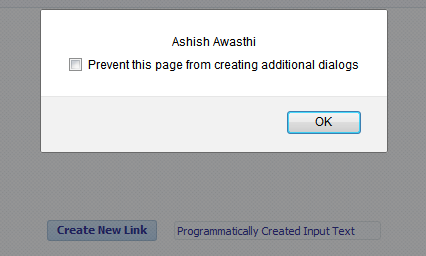
        ui.getAttributes().put("clientAttribute3", "Ashish Awasthi");

So all done , now check it
For that i have used this javascript method

function demoJsFunction(evt) {
                  var comp = evt.getSource();
                  alert(comp.getProperty('clientAttribute1'));
                  alert(comp.getProperty('clientAttribute2'));
                  alert(comp.getProperty('clientAttribute3'));
               
                  evt.cancel();
              }
 

this method is called using client listener on input text and see the alert messages
First client attribute value-

Second client attribute value-

Third client attribute value-

So this is working :)
Cheers :) Happy Learning

Friday, 29 May 2015

I am an Oracle ACE !

Hello All
Hope you all are doing well

I have a good news to share with you all that i have received an email from Oracle ACE team about accepting Oracle ACE Award and who will not accept it ? ;)

So i have accepted this award and  I am an Oracle ACE now :)


You want to know what is this Oracle ACE ?
The Oracle ACE program highlights excellence within the global Oracle community by recognizing individuals who have demonstrated both technical proficiency and strong credentials as community enthusiasts and advocates

I am proud to be part of this elite group of Oracle experts. It's really a big honor to get this title
I am 16th Oracle ACE from India :) This is the biggest award in my career now i'm more committed towards community


Take a moment to check my profile as ACE- Oracle ACE Details- Ashish Awasthi
Special thanks to Oracle ACE Waslley Souza for nominating me and many thanks to Oracle ACE Team, blog readers , my family , friends and well wishers for their support


Thanks
Ashish Awasthi

Apply Client/Server listener to programmatically created components, apply JavaScript to ADF Faces components at run time

Hello All

This post is next in series of "Working with ADF Faces Components programmatically"
Previous posts are-

Creating dynamic layout (form and UI Component) using ADF Faces
Get Value from programmatically created components , Iterate over parent component to get child values in ADF Faces 
Apply ActionListener to programmatically created buttons/link in ADF

Now this post is about applying client listener & server listener (to execute some javascript function) to a programmatically created component (inputText, outputText etc)

Let's see the implementation part (Jdev 12.13) -

  • First created a FusionWebApplication and a page in viewController project
  • Dropped a button on page , on this button action i will create an inputText programmatically
  • To create new inputText i have added following code (described in previous posts)


  •     /**Method to add dynamically created component to a parent layout
         * @param parentUIComponent
         * @param childUIComponent
         */
        public void addComponent(UIComponent parentUIComponent, UIComponent childUIComponent) {
            parentUIComponent.getChildren().add(childUIComponent);
            AdfFacesContext.getCurrentInstance().addPartialTarget(parentUIComponent);
        }


            //Code to create af:inputText and add it to panelgroup layout
            RichInputText ui = new RichInputText();
            ui.setValue("Programmatically Created Input Text");
            ui.setId("pit1");
            ui.setContentStyle("width:200px;color:navy");
            //getParentGroupLayoutBind is the component binding of parent panel group layout
            addComponent(getParentGroupLayoutBind(), ui);
    

  • Now first part is done - Creation of input text , next is to assign client and server listener to it
    So for that first we have to add some JavaScript function in page that will be called using clientListener
    I have added this JavaScript function in page, it just fires a custom event from client and pass component value as parameter

  •         function demoJsFunction(evt){
              var comp = evt.getSource();
              alert(comp);
              AdfCustomEvent.queue(comp, "ServerEventToGetValue", {fvalue:comp.getSubmittedValue()}, true);
              evt.cancel();
            }


  • One more thing is to define server listener method in managed bean so that we can apply it to inputText at run time

  •     /**Server Listener - It will be called on execution of client side javascript
         * @param clientEvent
         */
        public void testServerListener(ClientEvent clientEvent) {
            //To get value passed from Client Event
            String val = clientEvent.getParameters().get("fvalue").toString();
            FacesMessage msg=new FacesMessage("Server Listener Called and value in inputText is - " + val);
            msg.setSeverity(FacesMessage.SEVERITY_INFO);
            FacesContext.getCurrentInstance().addMessage(null, msg);
           
        }
    

  • Now create clientListener/ServerListener programmatically and assign both to inputText
    Pass server listener method name along with managed bean name

  •         // Create new Client Listener and assign method name and type
            ClientListenerSet CL = new ClientListenerSet();
            CL.addListener("click", "demoJsFunction");
            //Add Server listener , assign client event name and resolve pre-defined serverlistener
            CL.addCustomServerListener("ServerEventToGetValue",
                                       getMethodExpression("#{viewScope.Testbean.testServerListener}"));
    
            // Add clientListener/ServeListener to inputText
            ui.setClientComponent(true);
            ui.setClientListeners(CL);
    

    Helper method to resolve expression-

        /**To Resolve ServerListener method
         * @param s
         * @return
         */
        public MethodExpression getMethodExpression(String s) {
    
            FacesContext fc = FacesContext.getCurrentInstance();
            ELContext elctx = fc.getELContext();
            ExpressionFactory elFactory = fc.getApplication().getExpressionFactory();
            MethodExpression methodExpr = elFactory.createMethodExpression(elctx, s, null, new Class[] {
                                                                           ClientEvent.class });
            return methodExpr;
    
        }
    

  • All done , now run application and check , click on button it will create a inputText
         now click on input text and see server listener is called :)

This is how we can apply javascript in programmatic created components
Cheers :) Happy Learning