Please disable your adblock and script blockers to view this page

Search this blog

Showing posts with label Oracle ADF. Show all posts

Friday, 1 May 2026

PL/SQL vs Java Logic in Oracle ADF - What Should Go Where?

When developing applications using Oracle ADF, one of the most important architectural decisions is where to place your business logic - in the database using PL/SQL or in the middle layer using Java.

Making the wrong choice does not just affect code readability - it impacts performance, scalability, and long-term maintainability.

This guide provides clear, experience-based direction on how to decide what belongs where.


Understanding the Architecture

An Oracle ADF application typically consists of three layers:

A simple guiding principle:

  • Keep logic close to where it performs best and is easiest to maintain

When to Use PL/SQL

1. Heavy Data Processing

If your logic involves large datasets, complex joins, aggregations, or bulk operations, PL/SQL is the right choice.

Why:

  • Data processing happens inside the database
  • Minimal data transfer between layers
  • Better performance for large-scale operations

Examples:

  • Financial calculations across thousands of records
  • Batch updates or scheduled jobs
  • Complex reporting queries

2. Transaction-Critical Operations

For operations where data integrity is critical, PL/SQL provides strong transactional control.

Why:

  • Database ensures atomicity and consistency
  • Easier rollback and commit handling

Examples:

  • Payment processing
  • Inventory updates
  • Ledger entries

3. Reusable Database Logic

If the same logic is required by multiple systems or modules, placing it in PL/SQL ensures consistency.

Examples:

  • Validation rules shared across applications
  • Common calculation formulas
  • Data transformation logic

4. Data-Intensive Validations

Validations that depend on large datasets or multiple table checks should be handled in PL/SQL.

Why:

  • Avoids unnecessary data fetching into the application layer
  • Faster execution within the database


When to Use Java (ADF Business Components)

1. Application-Level Business Logic

Logic related to application behavior, workflows, or user interaction should reside in Java.

Examples:

  • Conditional UI-driven logic
  • Role-based processing
  • Dynamic behavior based on user actions

2. Entity Object Validations

ADF Entity Objects are ideal for row-level validations and business rules.

Examples:

  • Field validation
  • Attribute dependencies
  • Default value logic

Why:

  • Keeps validation close to the data model
  • Integrates well with ADF lifecycle

3. Orchestration Logic

When multiple operations need to be coordinated, Java (especially in Application Modules) is the right place.

Examples:

  • Calling multiple services or procedures
  • Combining different business rules
  • Managing application flow

4. Integration with External Systems

Any interaction with APIs, web services, or external systems should always be handled in Java.

Examples:

  • REST/SOAP calls
  • File processing
  • Third-party integrations

What to Avoid

Do Not Put Everything in PL/SQL

  • Makes the system rigid
  • Harder to debug and maintain
  • Reduces flexibility in application logic

Do Not Put Heavy Data Logic in Java

  • Causes unnecessary database calls
  • Slows down performance
  • Increases network overhead

Avoid Duplicating Logic

  • Same validation in both PL/SQL and Java leads to inconsistency
  • Always define a single source of truth

Practical Decision Guide

Use this quick rule:

  • Large data processing - PL/SQL
  • Critical transactions - PL/SQL
  • Shared logic across systems - PL/SQL
  • UI-driven logic - Java
  • Workflow and orchestration - Java
  • External integrations - Java

Final Thought

PL/SQL and Java are not competitors - they are complementary.

A well-designed ADF application uses both effectively:

  • PL/SQL for performance and data integrity
  • Java for flexibility and application control

The goal is not to choose one over the other -
but to place each piece of logic where it naturally belongs.

Thursday, 7 November 2024

Working with Dates in Oracle ADF and Java

Get Current JBO Date with Time 


Sometimes we need to get and set the current date in our Oracle ADF code

To get the current date in an Oracle ADF application using oracle.jbo.domain.Date, we can use this code, this code can be written in model implementation classes or in Managed Bean


 /**Method to get current JBO Date with time part
     * @return
     */
    public Date getCurrentJboDate(){
        Date currentDate = (Date) Date.getCurrentDate();
        return currentDate;
    }


Get the current JBO Date in a Specific format (JBO Date without time part)


There are times when you need to work with just the date and not the time, whether it's for formatting purposes or for cleaner data extraction. In such cases, you can use a simple code snippet to retrieve the date in a specific format. Here's how you can do it!

    /**Method to get current JBO Date in Specific format
     * @return
     */
    public Date getformattedJboDate() {
        DateFormat dateFormat = new SimpleDateFormat("yyyy-MMM-dd");
        java.util.Date date = new java.util.Date();
        String date1 = dateFormat.format(date);
        try {
            date = dateFormat.parse(date1);
        } catch (ParseException e) {
            e.printStackTrace();
        }
        
        java.sql.Date sqlDate = new java.sql.Date(date.getTime());
        oracle.jbo.domain.Date formattedDate = new oracle.jbo.domain.Date(sqlDate);
        return formattedDate;
    }

Convert java.util Date to java.sql Date


/**Method to convert java.util.Date to java.sql.Date * @return */ public java.sql.Date convertToSqlDate() { //Util Date java.util.Date date = new java.util.Date(); //SQL Date java.sql.Date sqlDate = new java.sql.Date(date.getTime()); return sqlDate; }


Convert java.util Date to oracle.jbo.domain Date


/**Method to convert java.util.Date to oracle.jbo.domain.Date * @return */ public Date convertToJboDate() { //Util Date java.util.Date date = new java.util.Date(); //SQL Date java.sql.Date sqlDate = new java.sql.Date(date.getTime()); //JBO Date oracle.jbo.domain.Date jboDate = new oracle.jbo.domain.Date(sqlDate); return jboDate; }

Get current day of week in Java 8 and later


To get the current day of the week in Java, you can use the LocalDate class from the java.time package, which is part of Java 8 and later. Here’s how you can do it:

import java.time.LocalDate; import java.time.format.TextStyle; import java.util.Locale; /**Method to get current day of week * */ public void getCurrentDayOfWeek() { // Get the current date LocalDate currentDate = LocalDate.now(); // Get the day of the week as a string String dayOfWeek = currentDate.getDayOfWeek().getDisplayName(TextStyle.FULL, Locale.ENGLISH); // Print the day of the week System.out.println("Today is: " + dayOfWeek); }

Code to get current day of week using Calendar class is like this

/**Method to get current day of week *using Calendar clas */ public void getCurrentDayOfWeek() { // Get the current date and time Calendar calendar = Calendar.getInstance(); // Get the day of the week (1 = Sunday, 2 = Monday, ..., 7 = Saturday) int dayOfWeek = calendar.get(Calendar.DAY_OF_WEEK); // Print the corresponding day of the week String dayName = ""; switch (dayOfWeek) { case Calendar.SUNDAY: dayName = "Sunday"; break; case Calendar.MONDAY: dayName = "Monday"; break; case Calendar.TUESDAY: dayName = "Tuesday"; break; case Calendar.WEDNESDAY: dayName = "Wednesday"; break; case Calendar.THURSDAY: dayName = "Thursday"; break; case Calendar.FRIDAY: dayName = "Friday"; break; case Calendar.SATURDAY: dayName = "Saturday"; break; } System.out.println("Today is- " + dayName); }

Get Number of days between 2 JBO Date


/**Method to calculate number of days between two jbo dates * @param date1 * @param date2 */ public void getNumberOfDaysBetweenDates(oracle.jbo.domain.Date date1, oracle.jbo.domain.Date date2) { long numberOfDays = 0; if (date1 != null && date1 != null) { numberOfDays = ((date1.getValue().getTime() - date2.getValue().getTime()) / (24 * 60 * 60 * 1000)); } }

Tuesday, 23 April 2019

Show Indian Currency Format in ADF using currencyFormatter jQuery

 Previously I have posted about Change af:converNumber format according to Locale but there is no option to show Indian currency format directly using locale so Here I am writing about showing Indian Currency format in ADF components using the currencyFormatter jQuery library.

From the docs

CurrencyFormatter.js allows you to format numbers as currencies. It contains 155 currency definitions and 715 locale definitions out of the box. It handles unusually formatted currencies, such as the INR.

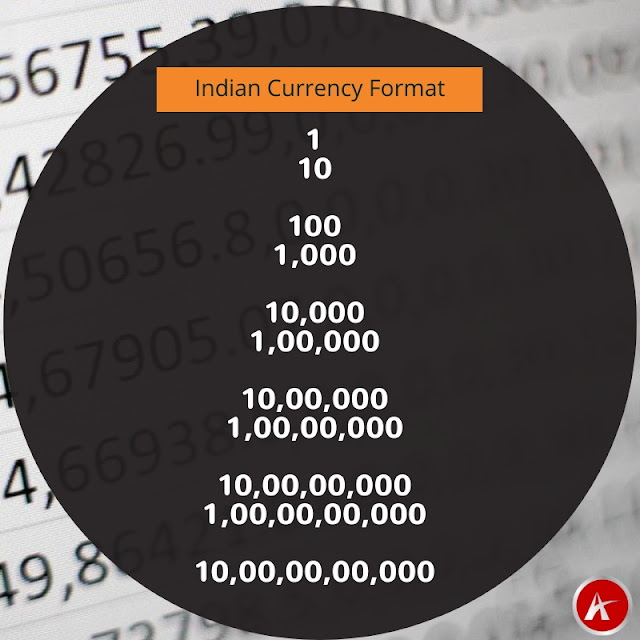
Indian currency format is a bit unusual as it uses variable-width grouping, See the below image to understand how numbers are grouped in INR.


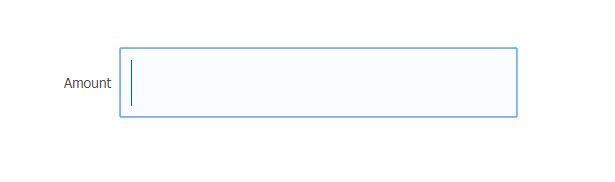
Let's see how to use the currencyFormatter jQuery library in our ADF application. Created an ADF Application and dropped an input text component on the page to enter the amount


Added jQuery library using resource tag under af:document

  1. <af:resource type="javascript"
  2. source="https://cdnjs.cloudflare.com/ajax/libs/jquery/3.1.1/jquery.min.js"/>
  3. <af:resource type="javascript"
  4. source="https://cdnjs.cloudflare.com/ajax/libs/currencyformatter.js/2.2.0/currencyFormatter.js"/>

Here goes the javascript function that formats the amount

  1. <af:resource type="javascript">
  2. function changeFormatInd(evt) {
  3. var val = $('input[name="it2"]').val();
  4. val.replace(/\,/g, "");
  5. var str2 = val.replace(/\,/g, "");
  6. //alert(str2);
  7. $('input[name="it2"]').val(OSREC.CurrencyFormatter.format(str2,
  8. {
  9. currency : 'INR', symbol : ''
  10. }))
  11. }
  12. </af:resource>

Called this function on value change event of input text using client listener

  1. <af:inputText label="Amount" id="it2"
  2. contentStyle="width:300px;padding:8px;font-weight:bold;color:#006394;font-size:30px;">
  3. <af:clientListener method="changeFormatInd" type="valueChange"/>
  4. </af:inputText>

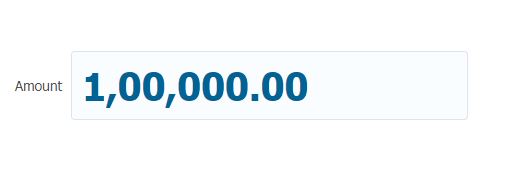
Now run application and check


Cheers 🙂 Happy Learning

Thursday, 18 April 2019

Populate Oracle JET table on top of Oracle ADF BC using REST Web Service

 Previously I have posted about creating REST Web Service from ADF Application Module and in this post, I am going to use the same REST service for populating data in a JET table. Here we'll populate JET table on top of Oracle ADF BC (Business Components).

Here I am taking the same sample application that I have discussed in my first post Getting started with Oracle JET and JDeveloper

The URL of ADF BC based web service is http://127.0.0.1:7101/RestWebServApp-RESTWebService-context-root/rest/Jdev12.2.1/Department and it returns a list of Departments in nested JSON format


Let’s see the implementation part

Add an oj-table component in the dashboard.html page and define the required number of columns, this web service returns a list of Departments so I have taken 4 columns for Department Id, Department Name, Manager Id, and Location Id

  1. <div class="oj-hybrid-padding">
  2. <h1>Dashboard Content Area</h1>
  3. <div id="div1">
  4. <oj-table id='table' aria-label='Departments Table'
  5. data='[[datasource]]'
  6. selection-mode='{"row": "multiple", "column": "multiple"}'
  7. dnd='{"reorder": {"columns": "enabled"}}'
  8. scroll-policy='loadMoreOnScroll'
  9. scroll-policy-options='{"fetchSize": 10}'
  10. columns='[{"headerText": "Department Id",
  11. "field": "dept_id",
  12. "resizable": "enabled"},
  13. {"headerText": "Department Name",
  14. "field": "dept_name",
  15. "resizable": "enabled"},
  16. {"headerText": "Manager Id",
  17. "field": "mgr_id",
  18. "resizable": "enabled"},
  19. {"headerText": "Location Id",
  20. "field": "loc_id",
  21. "resizable": "enabled"}
  22. ]'
  23. style='width: 100%; height: 400px;'>
  24. </oj-table>
  25. </div>
  26. </div>

Now see the code of dashboard.js, Read comments to understand the javascript code, Here getJSON() method of jQuery is used to call REST Web Service as jQuery is a part of Oracle JET libraries.

  1. /*
  2. * Your dashboard ViewModel code goes here
  3. */
  4. define(['ojs/ojcore', 'knockout', 'jquery', 'ojs/ojinputtext', 'ojs/ojtable', 'ojs/ojarraytabledatasource'],
  5. function (oj, ko, $) {
  6. function DashboardViewModel() {
  7. var self = this;
  8. //Define a Knockout observable array and name it tabData
  9. self.tabData = ko.observableArray();
  10. //Use jQuery method to call REST Web Service
  11. $.getJSON("http://127.0.0.1:7101/RestWebServApp-RESTWebService-context-root/rest/Jdev12.2.1/Department").
  12. then(function (departments) {
  13. //JSON response is nested that's why 'items' is used to access records
  14. $.each(departments.items, function () {
  15. //Push data in Observable array
  16. self.tabData.push( {
  17. dept_id : this.DepartmentId,
  18. dept_name : this.DepartmentName,
  19. mgr_id : this.ManagerId,
  20. loc_id : this.LocationId
  21. });
  22. });
  23. });
  24. //Pass observable array in utility class to show data in table
  25. self.datasource = new oj.ArrayTableDataSource(self.tabData,
  26. {
  27. idAttribute : 'dept_id'
  28. });
  29. .
  30. .
  31. .

tabData is a knockout observable array that is defined to hold returned value and you can see that
self.tabData.push is used to push web service data into this array and at last a JET utility class
ArrayTableDataSource is used to convert this observable array into tabular format data.

Now run the application and you can see that a JET table is populated with Departments data


Cheers 🙂 Happy Learning